Seguridad Mania.com - España y América Latina
Portal sobre tecnologías para la seguridad física
- Destacamos »
- software Anti Blanqueo

NASHUA, NH -- (Marketwired) -- 07/16/13 -- ConverterTechnology, provider of software and services to help enterprises upgrade to new versions of Microsoft Office and Microsoft Windows without the risks, costs, productivity loss and headaches that typically arise from enterprise deployments, today published a comprehensive comparison of its M3 Suite for Office and Microsoft's Office Telemetry Dashboard. Both are tools that can be used to help organizations during a migration to a newer version of Microsoft Office.
Significant technical and philosophical differences exist in how these two solutions function, including M3 Suite for Office's ability to avoid the hidden costs of lost productivity that can result when using the Office Telemetry Dashboard.
Comparative details are outlined in the recently published whitepaper "M3 Suite for Office versus Telemetry Dashboard," and validate the ability of ConverterTechnology's M3 Suite to save significant time and reduce costs throughout the entire migration process by addressing compatibility issues before rolling out new versions of MS Office and avoiding a fix-on-fail approach to file remediation.
"On the surface the methodologies used by Microsoft and ConverterTechnology appear quite similar, but the information provided, the impact on end users, IT and help desk teams, and the overall project duration are considerably different," said Shawn Allaway, CEO, ConverterTechnology. "No other solution is capable of identifying and automatically remediating 'at risk' Office files -- with minimal human intervention -- as quickly, thoroughly and accurately as ConverterTechnology's M3 Suite for Office."
Debate about Addressing Compatibility Before or After Deployment
Generally speaking, there are three approaches to identifying corrupt files, repairing the files, and mitigating risks associated with a migration. They are:
1) Fix-on-Fail - a post-deployment approach that limits the need to test each file. It results in remediating only actively used files but does not avoid end users uncovering compatibility issues in a live environment. Every corrupt file found results in lost productivity and end user dissatisfaction. As more broken files are identified, greater pressure is placed on the IT team to provide 'instant' fixes or risk an overwhelming influx of user requests for status updates to their file fix issues. End users may also begin to believe the new version of Office is unstable as the number of broken files increase.
2) Test and fix prior to deployment - avoids the downtime and aggravation associated with 'fix-on-fail' but it can delay the Office deployment. Some companies opt to test and fix a subset of all files (i.e., files modified within the last 60 or 90 days).
3) Test and fix prior to deployment with support for end-user submission of broken files - this hybrid approach allows organizations to test and remediate files on the network prior to deployment and adds the ability for end-user submission of broken files from their local machines.
Determining the best approach depends on a company's required level of risk mitigation. Companies with many users who depend upon their Office files working typically focus their migration efforts prior to deployment. The 'fix-on-fail' or hybrid approaches suit organizations with less reliance on Office files working at the time of deployment.
Benefits of Automation vs. Human Intervention -- Speed Deployment, Reduce Downtime
Both the MS Office Telemetry Dashboard and ConverterTechnology's M3 Suite for Office identify 'at risk' files. The Office Telemetry Dashboard is designed to log and track compatibility issues when they occur -- fix-on-fail -- compared to the M3 Suite for Office, which identifies compatibility issues before they occur. Other differences include:
The real power in the M3 Suite for Office comes during the testing phase which validates the resolution of compatibility issues before end users receive the files. This minimizes end user contact with help desk for added support, unlike the Telemetry Dashboard approach that requires the IT staff or help desk team to monitor the Telemetry Dashboard for incompatible files and to troubleshoot the issues. End users will still contact the help desk when they encounter broken files or may attempt to fix issues themselves, both of which waste time and money.
Allaway points out, "The entire Telemetry Dashboard approach has inherent risks -- select too many files and slow down the deployment, select too few or the wrong files and inundate the IT help desk with end users requests from file fixes. ConverterTechnology's solutions minimize the chance of selecting the wrong file set and provides most companies with a 90 percent or better success rate for automatic remediation of compatibility issues."
To read more about the product comparisons, download the "M3 Suite for Office versus Telemetry Dashboard" whitepaper by visiting http://www.convertertechnology.com/support/m3suiteversustelemetry/TelemetryWPOffer.aspx.
About M3 Suite for Office
ConverterTechnology's migration readiness suite of tools that provides the industry's most comprehensive support through the entire continuum of migration -- from planning through production and post-migration -- for organizations upgrading to a newer version of Microsoft Office.
About ConverterTechnology
ConverterTechnology is the only company to provide a comprehensive, automated Microsoft® Windows and Office migration solution that manages, tracks, and reports on the entire process. The company's innovative suite of tools, such as OfficeConverter™, DiscoverIT, Click2Fix™ and LinkLab™, bring tremendous value to the entire upgrade process, including planning, workflow, discovering files, identifying compatibility issues and remediation. Founded in 1997, ConverterTechnology has helped millions of users at Fortune 500 companies, global financial and pharmaceutical corporations, and the world's most renowned theme park, identify, analyze and fix compatibility errors before they occur, accelerating time to deployment. ConverterTechnology is headquartered in Nashua, N.H., with offices in Europe and Australia. For more information, please visit http://www.convertertechnology.com.
Contact:
Lauren Curley
781 383 6406
Email Contact
![La Ciberseguridad en Robots industriales según Trend Micro [Videos+Informe 48 págs]](https://www.seguridadmania.com/img/articles/71596/dentro.PNG)
Publicamos interesante Informe de más de 48 págs y varios videos demostrativos sobre los posibles ataques a los robots de montaje de las fábricas. ... Leer más ►
Publicado el 22-Jun-2017 • 10.48hs
Publicado el 20-Jun-2017 • 20.22hs
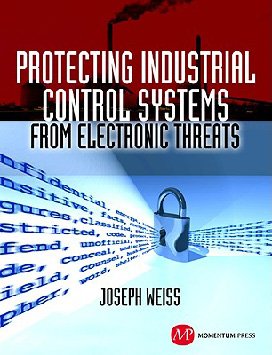
Dirigido tanto a los principiantes, como a los expertos en seguridad informática y sistemas de control industrial (ICS), este libro ayudará a los lectores a comprender mejor la protección de normas de control interno de las amenazas electrónicas. ... Leer más ►
Publicado el 3-Ene-2012 • 20.16hs
Publicado el 25-Set-2009 • 01.26hs
Publicado el 17-Dic-2008 • 08.32hs
Publicado el 11-Oct-2016 • 12.48hs
Publicado el 15-Mar-2016 • 11.59hs
Publicado el 2-Feb-2017 • 11.38hs
Publicado el 20-Jun-2014 • 17.17hs
Publicado el 31-May-2011 • 05.13hs
Publicado el 25-Set-2008 • 17.54hs
Publicado el 1-Set-2016 • 16.11hs
Publicado el 31-Ago-2016 • 18.53hs
Publicado el 19-Ene-2017 • 15.47hs
Publicado el 4-Jul-2016 • 18.51hs
 © 2001-2026 DAA Contenidos Digitales, S.L.
![IBM Security Trusteer: Suite para protección avanzada contra el fraude. Introducción y demo. [Video]](https://www.seguridadmania.com/img/articles/71525/Captura.PNG)


![Ciberseguridad en Comunicaciones y Skype para empresas con Voiping [Video-entrevista de 40 mnts.]](https://www.seguridadmania.com/img/articles/71425/Volping.PNG)
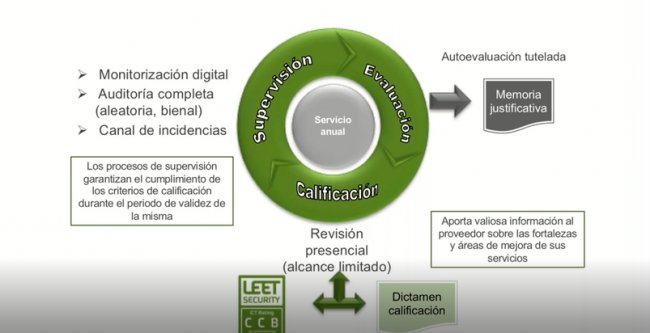
![Ciberseguridad en la gran empresa según el CIO de Vocento [Webinar de 6o min]](https://www.seguridadmania.com/img/articles/71622/vocento.png)